 Ambient
Introducing vlm.fyi: is your vision model seeing the same video on every provider?
Send the same video to Kimi K3.1 Pro on Fireworks, Moonshot and Together, and you can get three different answers. Sampling randomness isn’t the cause. Each provider processes the video its own way before the model sees it, so each one shows the model a different version of your video. On a 30-second 1080p clip, Fireworks fed the model 240 frames, Moonshot fed it 60, and Together fed it none at all, while still returning HTTP 200.
We found this out the hard way. Ambient is a video engine for AI agents that runs on whatever OpenAI-compatible endpoint its user points it at, and the quality of its answers depended on which provider happened to serve the request. Requests routed through an aggregator sometimes landed on a provider that sampled the video down to a few frames, without an error and without anything in our logs to explain why the answers got worse. Pinning a provider fixed it until that provider changed its limits.
Today we’re publishing vlm.fyi, the measurements we now rely on: 81 endpoints, covering 10 vision models on 33 providers, called directly or through OpenRouter with the upstream pinned. The rest of this post goes through what we found, how we measure it, and how Ambient uses it.
Kimi K3.1 Pro: how many frames each provider shows the model
Kimi K3.1 Pro is served directly by Moonshot, Fireworks and Together, and by eight upstreams on OpenRouter. Kimi merges every four sampled frames into one chunk before encoding it, and providers bill per chunk, so the number of frames a route passes to the model can be read off its bill.
- Fireworks direct 240 8 frames per second in 60 chunks of 2,691 tokens: exactly Kimi's reference preprocessing.
- Fireworks via OpenRouter 240 Billed the same as Fireworks direct: 324,240 tokens per minute.
- Moonshot AI direct 60 15 chunks: each video stops at about 40,000 visual tokens, from 8-second clips to 6-minute ones. Video must be sent inline as base64.
- Moonshot AI (mxfp4) via OpenRouter 60 Billed the same as Moonshot direct.
- Moonshot AI (highspeed) via OpenRouter 60 Billed the same as Moonshot direct.
- Together AI direct Accepted with HTTP 200, 0 video tokens billed
- 5 other upstreams via OpenRouter No route: removed by OpenRouter's video filter Together AI, Modal, Nebius, Alibaba Cloud and DeepInfra.
Measured November 4 to 8, 2026. Data
Each route causes a different problem for a video pipeline.
On Moonshot, every video stops at about 40,000 visual tokens. At 1080p that is 15 chunks, or 60 frames, whether the video lasts 8 seconds or 6 minutes: our bills for every clip in that range came to exactly 40,480 tokens. On a 5-minute video, 60 frames spread evenly would be one every five seconds, so a key moment can fall between them, and the model can only answer from what it saw. Lower-resolution video gets more frames under the same budget.
On Fireworks, the bill matches Kimi’s reference preprocessing exactly: eight frames per second, merged four at a time into chunks of about 2,700 tokens at 1080p, or 324,240 tokens per minute of video. A 5-minute video comes to about 1.7 million tokens. When we sent the whole clip on November 5 it timed out at 300 seconds, and the first minute alone took about seven minutes to process. On November 8 the same minute came back through OpenRouter in 58 seconds, so processing time isn’t stable either.
On Together’s direct API, the request succeeds and bills the same prompt tokens with the video as without it. Asked to list the frame numbers, the model replied “I don’t have access to the video frames.” A pipeline that checks only the status code would record that as a successful call. Through OpenRouter, Together, Modal, Nebius, Alibaba and DeepInfra are removed by OpenRouter’s own video filter, and a request pinned to one of them fails with “no endpoints found”.
Image limits on this one model range from 30 per request on DeepInfra to 999 on Together, both stated in the providers’ error messages.
DeepSeek V4.1 Flash
DeepSeek V4.1 Flash takes images and not video, so a video pipeline sends it frames. How many frames fit depends on the provider.
- Modal direct 999 Stated in the error: 999.
- Jarvislabs direct 999 Inline bodies are limited to 12 MB, and above 5 to 8 MB the upload times out. Images by URL avoid both.
- Together AI direct 839 Also caps decoded media at about 1.43 GB per request, a limit on pixels rather than bytes.
- Fireworks direct 120 Counts every image in the messages array, not per message.
- Fireworks via OpenRouter 120 Stated in the error: 120.
Measured October 31 and November 4, 2026. Data
Fireworks allows 120 images across the full conversation. At two frames per second, that is enough for an agent to inspect only one minute of footage before the next batch pushes the request over the limit. Modal and Jarvislabs allow roughly eight minutes at the same sampling rate.
Qwen3.8 27B: same frame count, different resolution
Two routes can pass the same number of frames and still show the model very different images. On Qwen3.8 27B, ten routes pass 120 frames a minute of a 5-minute 1080p video. They differ in how far they shrink those frames first, which the bill shows.
- Alibaba Cloud via OpenRouter · 616 frames · 1056×576 35,640 Two frames per second. Each pair of frames costs 594 tokens, under a cap of about 640, with no total budget.
- Novita via OpenRouter · 616 frames · 1056×576 35,640 Two frames per second. Billed the same as Alibaba Cloud.
- Jarvislabs direct · 616 frames · 256×128 2,499 Two frames per second. Qwen's reference preprocessing.
- 7 other upstreams via OpenRouter · 616 frames · 256×128 2,499 Two frames per second. AkashML, Chutes, Cloudflare, Parasail, Reka and Venice bill 2,499; ModelRun bills 2,498.
- CoreWeave (fp8) via OpenRouter · 32 frames · 1152×640 2,274 A fixed 32 frames per video, however long it is: one about every 10 seconds here.
Tokens measured October 31 to November 4, 2026; frame curves November 7, 2026. The rest of the 22 routes are on the model page. Data
Here is what that difference looks like, on a frame from one of our own tracking demos. The worker is at the far end of the aisle, inside the green box.
1056×576Alibaba Cloud, Novita
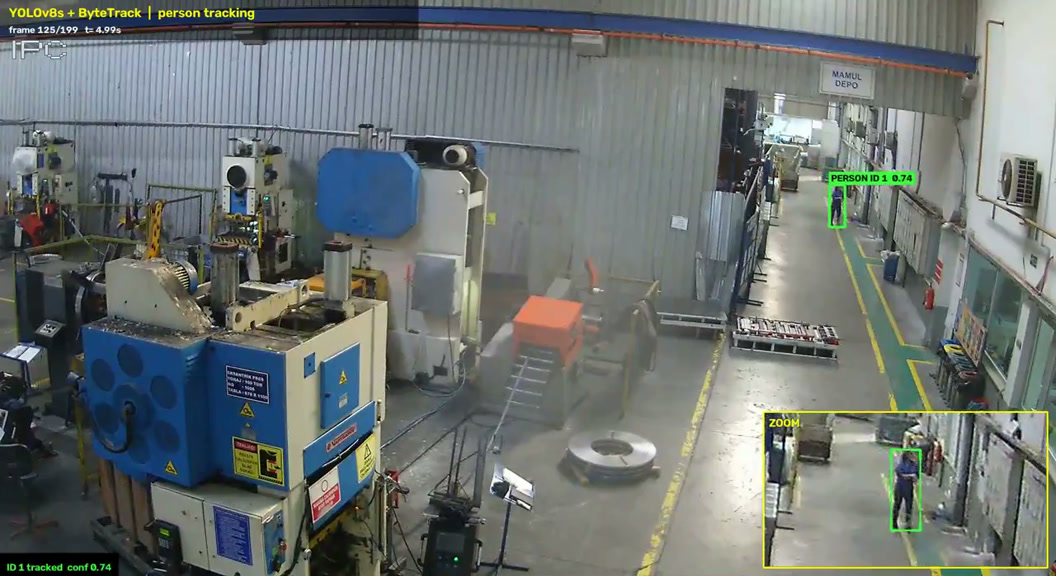
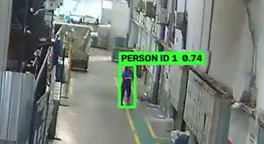
256×128Jarvislabs and 7 upstreams

Bottom row: the same region of the far aisle, cut from each resized frame. The green box and label are part of the demo footage. The source is a 720p frame that we resized with bicubic interpolation to each route's frame size; it isn't the providers' own output.
The 256×128 routes follow the model’s own preprocessing. Qwen’s reference code gives each video a budget of about 25 megapixels across all its frames, so frames shrink as the video gets longer: 832×480 at 30 seconds, 608×320 at one minute, 256×128 at five. Alibaba Cloud and Novita have no total budget and stay at 1056×576 at any length. Mancer’s 832×448 on the model page is the reference rule too, on the 32-second clip it accepted, because it refuses the 5-minute video.
So the routes stay close on a short clip and drift apart as videos get longer. At 30 seconds the frames are 832×480 and 1056×576, about 1.5 times apart in pixels. At five minutes they are 19 times apart, and Alibaba bills 14 times the tokens. An evaluation on short clips won’t show this. CoreWeave and DarkBloom take the other trade: CoreWeave keeps frames at 1152×640 but sends 32 per video, and DarkBloom sends 8.
One request, many upstreams
On OpenRouter, one model id is served by many upstream providers, and unless you pin one, OpenRouter picks per request. For video, that choice decides how much of the video the model sees. For Qwen3.6 35B A3B, most upstreams sample the same two frames per second. What differs is how far each one shrinks those frames, which shows up in the tokens billed for a 5-minute 1080p video:
- Atlas Cloud (fp8) pinned · 616 frames · 1056×576 35,757 Two frames per second. Each pair of frames costs 594 tokens, under a cap of about 640, with no total budget.
- AkashML (fp8) pinned · 616 frames · 256×128 2,499 Two frames per second. Qwen's reference preprocessing.
- DekaLLM pinned · frames not determined 2,330
- CoreWeave (fp8) pinned · 32 frames · 1152×640 2,274 A fixed 32 frames per video, however long it is: one about every 10 seconds here.
- DeepInfra (fp8) pinned · 616 frames · 32×32 639 Two frames per second, under a pixel budget of about 1 megapixel per video.
- SiliconFlow (fp8) pinned Varies: the same 64-second clip billed 38,022 tokens, then 1,442
Tokens measured October 31, 2026; frame curves November 7 and 8, 2026. Data
Atlas Cloud and AkashML both pass 120 frames a minute, and they split the same way as Qwen3.8: 1056×576 on Atlas and 256×128 on AkashML. DeepInfra also passes 120 frames a minute, at 32×32 pixels, and CoreWeave keeps its frames large but sends only 32 per video. SiliconFlow billed the same 64-second clip 38,022 tokens on one request and 1,442 on the next. If your evaluation ran on one upstream and production lands on another, the evaluation doesn’t describe production.
Some routes are consistent and match the documentation. Gemini 3.7 Flash bills exactly 66 tokens per second of video on all seven Google routes we measured on OpenRouter (AI Studio and Vertex, standard, flex and priority), which matches Google’s documented rate of one frame per second at 66 tokens.
- Google AI Studio pinned 308
- Google AI Studio (flex) pinned 308
- Google AI Studio (priority) pinned 308
- Google Vertex (global) pinned 308
- Google Vertex (global, flex) pinned 308
- Google Vertex (global, priority) pinned 308
- Google Vertex (us) pinned 308
Measured November 7, 2026. Image limits differ across these routes: 768 to 960 per request. Data
Limits change without notice
On October 31, Fireworks accepted video for Kimi K3 up to 96 MB per file and billed 162,120 prompt tokens for our 30-second test clip, so the video was reaching the model. When we reran the probe on November 3, every video request came back with “we currently limit the number of videos per conversation to 0”, and a request sent by hand outside the probe got the same answer. On November 4 the error changed to “EPD video encoding is not supported”. In the same week, Fireworks served video for Kimi K3.1 Pro at its full reference density, so a provider can support video on one version of a model and not on the previous one.
A pipeline that checked Fireworks for video support on October 31 would have been failing on every video request by November 3. A one-time compatibility check isn’t enough, which is why vlm.fyi reruns its probes and dates every entry.
More in the data
The examples above are a small part of what’s measured. vlm.fyi covers 10 models on 33 providers, with the same set of limits for each. A few more from the current data:
- GLM 5.3 Flash gets 120 frames a minute on Fireworks, Z.ai and Jarvislabs, but each fits a 5-minute video into a different token budget, so the frames end up at 1036×588, 952×532 and 364×196. Together takes 32 frames per video, however long.
- Muse Spark (open) follows its reference preprocessing on Nebius: two frames per second, up to 600 frames per video. Together does the same on the clips it accepts, but refuses 1080p video longer than about a minute.
- Gemma 4 31B on Jarvislabs accepts video files up to 256 MB but only 4 images per request.
- Qwen3.8 27B has 22 routes, from 650 images per request on Phala to 2 on Cerebras.
The calculator takes a model and a video length and shows, for every provider, how much of the video the model can see in one request. The table puts every endpoint and limit in one view.
How we measure
Each probe is a minimal chat-completions request (“Reply with OK.”, 16 output tokens) carrying synthetic media built to stress one limit at a time. The image count uses tiny 64×64 images, so bytes and pixels stay negligible. The body limit uses images padded with JPEG comment segments, which decoders skip. Video file size uses a 5-second clip padded with an MP4 free box. For each limit the probe doubles the size until a request fails, then bisects between the last pass and the first failure, and keeps the provider’s error text as evidence.
For video, an HTTP 200 doesn’t say how much of the video the model received, so we read the provider’s own billing. We send a 5-minute reference clip; prompt tokens with the video, minus prompt tokens for the same prompt without it, divided by the clip length, gives video tokens per minute. For frames, we send clips of known length, frame rate and resolution and record what each is billed. Each model’s own preprocessing code says how many frames a clip becomes and what each costs, so a route gets a frame count only when one setting reproduces the bill for every clip to within one token. No number on the site comes from the model’s reply.
A “no” took more care than we expected. Moonshot’s API refuses video URLs but accepts the same video base64-encoded. Some providers decode H.264 and not VP9, and some cap duration, from 30 seconds on Decart to five minutes on Baseten. Our first pass recorded several of these as “no video”. The probe now retries inline, re-encoded, at 360p and trimmed before it concludes anything, and the site only says a provider doesn’t take video when the provider or OpenRouter states it, or the model has no video input. On OpenRouter we pin each upstream in turn with fallbacks off, so every entry describes one provider.
Every entry carries the date it was measured, and the changes page lists each limit that moved between runs, with an RSS feed.
The methodology page explains the approach in detail, including how to read each value and the caveats that apply to it.
How Ambient uses the data
This data plays a critical role in making sure our agents see the video at the highest fidelity possible for the selected provider and model. It also helps us choose the best defaults for each model to maximize the quality of the outcome.
Ambient uses the data to drive two decisions. The first is whether to send a video file or frames. Ambient can give the model a video or a set of frames it extracted itself, and the measured entry can veto the video path: when the provider rejects video, accepts it but never shows it to the model, samples fewer frames than the step needs, or caps files below this video’s size. Ambient then extracts frames at the rate the step asked for, so it controls the count and every frame keeps an exact timestamp for citations.
The second is how much media fits in each request. Media builds up over a long agent session, because every turn resends what came before. Ambient sizes each request from the endpoint’s measured limits and leaves headroom below them. When a session approaches those limits, it condenses older media gradually instead of dropping it, so the agent never sends a request the provider will reject and doesn’t lose track of what it has already seen. The opening video context and the current turn’s results are kept, unless they alone would exceed the limit. Where an endpoint hasn’t been measured, Ambient falls back to conservative defaults.
Using it in your own pipeline
The data is open and free to use. It’s at vlm.fyi/v1/capabilities.json and as CSV, with the change history at vlm.fyi/v1/changes.json. The probe is open source in the vlm-fyi repository, and it’s worth running against your own account, because plan, region and bring-your-own-key setups can change the limits.
A few things we learned that apply whether or not you use the data:
- On OpenRouter, pin the upstream for video. Unpinned requests can land on any upstream, and for Qwen3.6 35B A3B the same 5-minute video was billed anywhere from 639 to 35,757 tokens a minute depending on the upstream.
- Check what the model received. An HTTP 200 only means the provider accepted the request. Comparing prompt tokens with and without the media shows whether it reached the model, and how much of it.
- Leave headroom below any measured limit and recheck it on a schedule. Fireworks turned off Kimi K3 video between two of our runs three days apart.
If a limit on vlm.fyi is wrong or out of date, open an issue with the request you sent and the error you got. Providers who want an endpoint measured can write to hello@vlm.fyi. Ambient is open source, and if your team runs video analysis on hosted models, we’re happy to talk about what it handles for you.