

Example: car damage report
This example builds a vehicle damage inspector on top of Ambient. You give it a walk-around video of a car, and it returns:
- An inspection report: every visible scratch, dent, crack, and broken part, with the timestamps where each one appears and annotated frames as evidence. When the engine has an S3 bucket configured, the agent publishes the report as an HTML page and returns a link.
- The same findings as JSON, validated against a schema you define, ready to send to a claims or repair system.
It uses the same five calls as the SDK quickstart, plus a custom system prompt, structured output, and a follow-up question in the same session.
What you’ll build
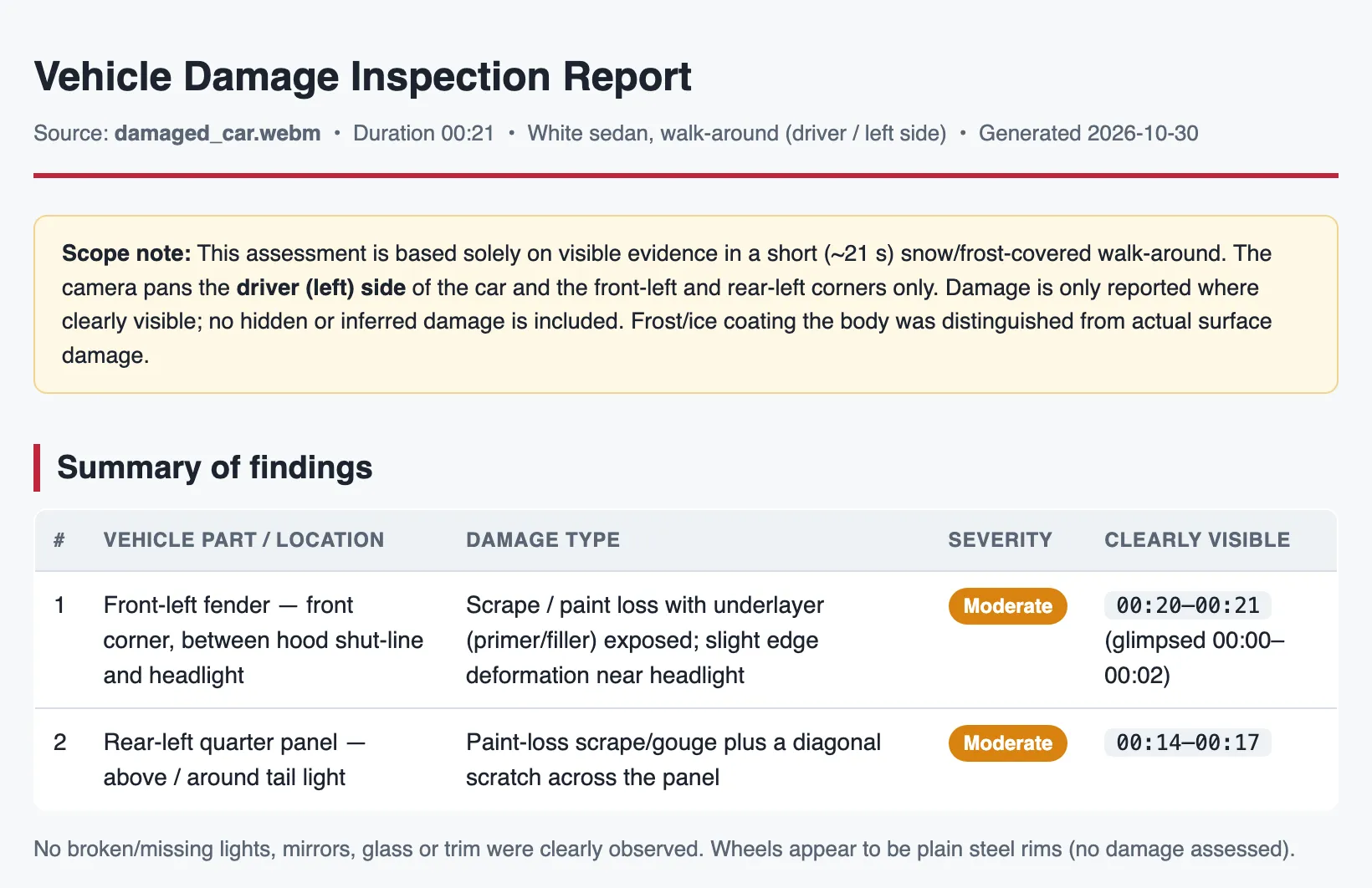
Section titled “What you’ll build”From a walk-around video of a damaged car, the agent produced this report. It found two areas of damage, rated each one, cited where they’re visible, and listed what the video never showed:
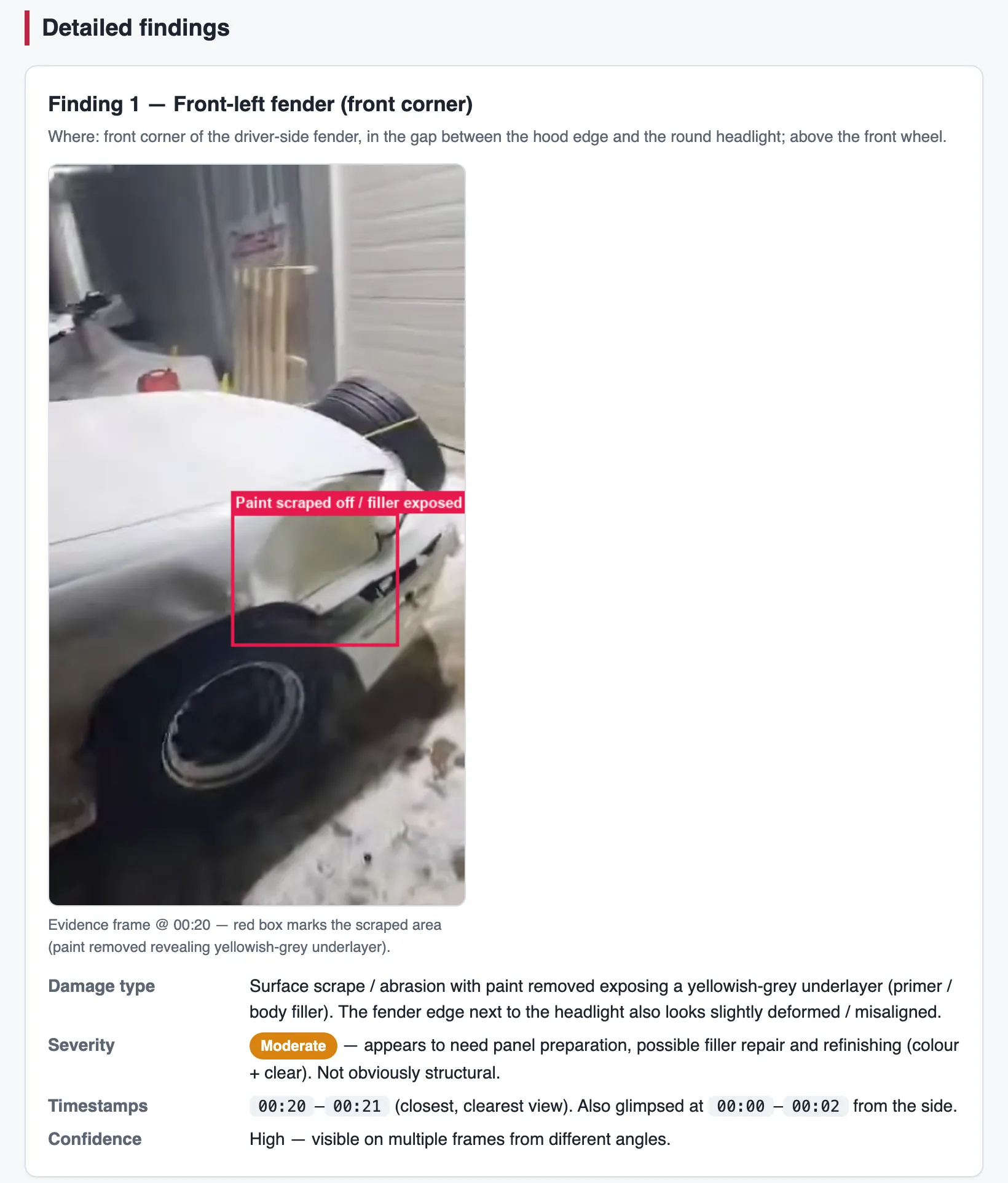
Each finding has an annotated frame as evidence. The agent drew the box, grabbed the frame, and built the page itself:
Before you start
Section titled “Before you start”- A running engine and your engine URL and API key. If you don’t have one, follow the Quickstart, then find your URL and key.
- A walk-around video of a vehicle. Use your own. Short, steady, well-lit footage that covers every side of the car gives the best results.
- For the HTML report link: the engine needs S3 storage configured, which enables the agent’s
upload_artifacttool, and thebashtool enabled (it’s on by default). Without these you still get the full report, as Markdown. - For drawn bounding boxes: an image-capable
AGENT_MODEL. Ambient picks the agent’s tools from the model’s abilities: image-capable models can draw boxes on frames, and text-only models get an annotation tool instead.
import os, hashlib, timefrom pathlib import Pathfrom anthropic import Anthropic
client = Anthropic(    base_url=os.environ.get("AMBIENT_BASE_URL", "http://127.0.0.1:8080"),    api_key=os.environ.get("AMBIENT_API_KEY", "dev-token"),)VIDEO_PATH = Path("damaged_car.mp4")  # your walk-around video
1. Define the agent
Section titled “1. Define the agent”An agent is a reusable template: a model, a system prompt, and a mode. Ambient already has a general video prompt that teaches the model to search the video, zoom into clips, and cite timestamps. Your system prompt is added to it as the task; it doesn’t replace it. So you describe the job, and Ambient handles how to watch a video.
SYSTEM_PROMPT = """You are a vehicle damage inspector producing reports for insurance and repair estimates.
Inspect the walk-around video and identify every *visible* instance of damage: scratches, scuffs, dents,cracks, chipped paint, broken or missing components (lights, mirrors, trim, glass).
For each finding report:- the vehicle part (e.g. "front bumper", "driver-side rear door") and where on that part it is,- the damage type and a severity: minor (cosmetic), moderate (needs panel repair), severe (needs replacement or affects safety),- the timestamps (mm:ss) where it is clearly visible,- an annotated frame marking the damaged region, as evidence.
Rules:- Track the same damage across frames and report it once.- Only report damage you can see. Never infer hidden or likely damage.- List the areas of the vehicle the video never shows clearly, so the reader knows what was not inspected.
Deliverable: an HTML report with a summary table, one section per finding with its annotated image, and thenot-inspected areas. Upload it and give me the link. If you cannot upload files, return the same report as Markdown."""
Writing a good task prompt
Section titled “Writing a good task prompt”The same rules apply to any inspection or reporting task, not just cars:
- Say what to look for, and what to ignore. Here: visible damage only, no guessing about hidden damage.
- Define the output. The fields for each finding, a severity scale, and what the summary contains.
- Ask for evidence. Timestamps on every finding, plus annotated frames.
- Handle duplicates and gaps. The same dent shows up in many frames, and some panels may never be visible.
Then create the agent, or reuse it if it already exists:
AGENT_NAME = "car-damage-inspector-" + hashlib.sha256(SYSTEM_PROMPT.encode()).hexdigest()[:8]
agent = next((a for a in client.beta.agents.list() if a.name == AGENT_NAME), None)if agent is None: agent = client.beta.agents.create( name=AGENT_NAME, model=client.beta.agents.retrieve("ambient_v1").model.id, # the engine's configured model system=SYSTEM_PROMPT, tools=[{"type": "video_agent_20260825"}], # agent mode )- Name with a prompt hash. Agents can’t be updated or deleted through the API, so the code looks the agent up by name and only creates it if it’s missing. Because the name includes a hash of the prompt, editing
SYSTEM_PROMPTgives you a new agent instead of silently reusing the old one. - Borrowed model. The SDK requires a
model. Taking it from the built-inambient_v1agent guarantees a model your LLM endpoint actually serves. Pass any other model id that endpoint serves to pin a different one. - Agent mode. The
video_agent_20260825marker selects agent mode: a multi-step tool loop that searches the video, zooms into clips, and draws on frames. A damage report needs that frame-accurate evidence.video_fast_20260825would select fast mode, a single vision pass with no tools.
2. Upload the video
Section titled “2. Upload the video”with VIDEO_PATH.open("rb") as fh: video = client.beta.files.upload(file=(VIDEO_PATH.name, fh, "video/mp4"))The returned id (vid_…) is the video id you use everywhere else. Ids are derived from the file’s contents, so uploading the same file again returns the same id and reuses the work already done on it.
3. Open a session
Section titled “3. Open a session”session = client.beta.sessions.create( agent=agent.id, environment_id="default", metadata={"video_id": video.id, "max_turns_per_run": 40}, title=f"Damage report: {VIDEO_PATH.name}",)
for _ in range(120): # wait until the session can take a message status = client.beta.sessions.retrieve(session.id).status if status in ("idle", "running"): break if status == "terminated": raise RuntimeError("session failed to start; check the engine log") time.sleep(1)A session binds the agent to one video and keeps the conversation, so the follow-up in step 5 builds on what the agent already found.
max_turns_per_run is the agent’s step budget for one message (default 20). A full inspection with annotated frames and an uploaded report needs more steps than a quick question, so this example raises it to 40. If a run hits the limit, it ends with stop reason max_turns and returns what the agent has so far.
4. Ask for the report
Section titled “4. Ask for the report”This helper sends a message, prints each tool call so you can follow the inspection, and returns the final answer. It also takes an optional JSON schema, used in step 5.
def ask(question: str, output_schema: dict | None = None) -> str:    extra = {"output_structure": output_schema} if output_schema else None    client.beta.sessions.events.send(        session.id,        events=[{"type": "user.message", "content": question}],        extra_body=extra,    )
    answer = ""    with client.beta.sessions.events.stream(session.id) as stream:        for ev in stream:            if ev.type == "agent.tool_use":                print(f"→ {ev.name}")            elif ev.type == "agent.message":                answer = "".join(getattr(b, "text", "") for b in ev.content)            elif ev.type == "session.error":                print("session error:", ev.error)            elif ev.type == "session.status_idle":                print(f"done ({ev.stop_reason})")    return answer
report = ask("Inspect this vehicle and produce the damage report.")
A thorough inspection takes a few minutes. You’ll see the agent work through the video: zooming into the stretches that show damage, grabbing frames, drawing boxes, checking its own annotated images, then building and uploading the page.
→ focus_clip # watch 13.5–17.5 s closely→ focus_clip # and 18.5–21.1 s→ grab_frames→ draw_bounding_box # mark the rear quarter panel scrape→ draw_bounding_box # mark the front-left fender dent→ bash # render the annotated frames with ffmpeg and Pillow→ read_image # verify the box placement→ read_image→ bash # build the HTML report→ upload_artifact # publish it and get a linkdone (end_turn)report holds the answer as Markdown. When the agent uploaded the HTML version, the link is in that text.
5. Get the findings as JSON
Section titled “5. Get the findings as JSON”A readable report is for people; downstream systems need fields. Define the shape with Pydantic and pass its JSON Schema as output_structure, an Ambient extension sent through the SDK’s extra_body:
from typing import Literal, Optionalfrom pydantic import BaseModel, Field
class DamageFinding(BaseModel):    part: str = Field(description="Vehicle part, e.g. 'front bumper'")    location: str = Field(description="Where on the part, e.g. 'lower left corner'")    damage_type: Literal["scratch", "scuff", "dent", "crack", "chipped_paint", "broken", "missing", "other"]    severity: Literal["minor", "moderate", "severe"]    description: str    timestamps: list[str] = Field(description="mm:ss times where the damage is clearly visible")    evidence_url: Optional[str] = Field(None, description="Link to the annotated frame, if one was produced")
class DamageReport(BaseModel):    vehicle: str = Field(description="Make, model and colour if visible, else 'unknown'")    findings: list[DamageFinding]    not_inspected: list[str] = Field(description="Vehicle areas the video never shows clearly")    overall_assessment: str    report_url: Optional[str] = Field(None, description="Link to the HTML report, if one was uploaded")
raw = ask(    "Return the findings from your inspection as structured data.",    output_schema=DamageReport.model_json_schema(),)damage = DamageReport.model_validate_json(raw[raw.find("{"): raw.rfind("}") + 1])
Because this is a follow-up in the same session, the agent reuses everything it already found. It reformats the inspection instead of starting over, so this run is much quicker.
damage is now an ordinary Python object, ready to store or send on:
{ "vehicle": "White sedan (make/model unknown)", "findings": [ { "part": "driver-side rear quarter panel", "location": "above and inboard of the amber tail light", "damage_type": "scratch", "severity": "moderate", "description": "Paint-loss scrape/gouge with a distinct diagonal scratch running across the panel above the tail light. Needs panel repair and refinishing.", "timestamps": ["00:14", "00:15", "00:16", "00:17"], "evidence_url": null } ], "not_inspected": [ "Passenger (right) side: doors, fenders, quarter panel, right mirror", "Rear end: rear bumper, trunk lid, right tail light" ], "overall_assessment": "Two moderate, visible instances of paint-loss/scrape damage on the driver side...", "report_url": "https://<your-s3-endpoint>/<bucket>/artifacts/vid_…/vehicle_damage_report.html?…"}6. Check what it cost
Section titled “6. Check what it cost”The session keeps a running total across every run, including the model calls made inside tools:
usage = client.beta.sessions.retrieve(session.id).usageprint(f"input tokens: {usage.input_tokens:,} output tokens: {usage.output_tokens:,} cost: ${usage.cost:.4f}")A full inspection like this one used about 4.3 million input tokens, because the agent looks at many frames and clips. cost is computed from the engine’s price table and reads $0 for models it has no pricing for.
Adapt it to your use case
Section titled “Adapt it to your use case”- Ask follow-ups in the same session, for example “Show me the best frame of the rear bumper damage” or “Which findings would need a body shop?”
- Reuse the agent across videos. Open a new session per vehicle with the same
agent.id. Agents are templates; sessions are per video. - Tune the prompt to your process: your own severity scale, required camera angles, or part names from your claims system. Changing
SYSTEM_PROMPTcreates a new agent automatically. - Use fast mode for triage. An agent with
tools=[{"type": "video_fast_20260825"}]answers in one vision pass. It’s much quicker and cheaper, but gives less precise timestamps and no annotated evidence.